OAuth2 & OpenID Connect
Fully compliant with OAuth2 (RFC 6749) and OpenID Connect standards, compatible with all major authentication libraries and frameworks.
A fully compliant OAuth2 and OpenID Connect service that provides hosted, secure, scalable, multi-tenant authentication and user management for your applications. Designed for seamless integration. No need to re-invent the wheel. Integrate with simple APIs, and launch your products in record time.

Get started with authentication in minutes, with Agglestone's Authentication and User Management Service. Configure your OAuth2 (RFC 6749) client and add a login button to your application.
Our service provides everything you need for secure user authentication and management. Built on industry-standard protocols and designed for modern applications.
Fully compliant with OAuth2 (RFC 6749) and OpenID Connect standards, compatible with all major authentication libraries and frameworks.
Use the .well-known endpoint for automatic configuration (RFC 8414). No manual setup required - just point your client to the discovery endpoint.
Proof Key for Code Exchange (PKCE) (RFC 7636) enabled by default for enhanced security, especially important for public clients and mobile apps.
Access tokens are short-lived by default, reducing the risk of token theft. Automatic refresh token rotation keeps sessions secure.
All tokens are cryptographically signed JSON Web Tokens (JWT) (RFC 7519). Each tenant has its own signing authority, ensuring complete tenant isolation and independent key management.
Time-based One-Time Passwords (TOTP) (RFC 6238) for 2FA / MFA support out of the box. Users can setup by scanning QR Code with their favourite authenticator app.
Users can securely reset their passwords through email verification. No admin intervention required.
Fully customizable authentication pages using HTML and CSS. Match your branding on login, password reset, MFA, and verification screens.
Configurable refresh token behavior based on IP address. Require full login from new IPs or allow silent refresh for known addresses.
Support for email-as-username or distinct "non-email" usernames. Configure per tenant to match your user model.
Allowed origins and request validation ensure only authorized applications can use your authentication endpoints.
Incremental adoption paths with user import, mapping, and compatibility modes to migrate from existing auth systems.
Long-lived API keys for server-to-server authentication. Primary and secondary keys with rotation support for background services and automated processes.
Complete REST APIs for managing users and groups. Create, update, delete, and organize users with role-based access control and pagination.
OAuth2-compliant token introspection (RFC 7662) and revocation (RFC 7009) endpoints. Verify token validity and revoke tokens when needed for enhanced security.
BFF pattern support keeps tokens secure in your backend. Use httpOnly cookies and session-based auth for simpler, more secure frontends.
Built-in multi-tenancy with complete tenant isolation. Every request is tenant-scoped, ensuring data security and separation.
Comprehensive login attempt tracking with IP address logging. Monitor user access patterns and enhance security with detailed audit trails.
Security is built into every aspect of our authentication service. We follow industry best practices and implement the latest security standards.
PKCE is enabled by default for all authorization flows, providing an additional layer of security against authorization code interception attacks. This is especially important for public clients and mobile applications.
Access tokens are designed to be short-lived, minimizing the window of opportunity for attackers if a token is compromised. Tokens automatically expire, and refresh tokens are used to obtain new access tokens seamlessly.
All tokens issued by the service are JSON Web Tokens (JWTs) (RFC 7519) that are cryptographically signed. Each tenant has its own signing authority with dedicated cryptographic keys, ensuring complete tenant isolation and independent key management.
Public keys for token verification are available through the JWKS endpoint (RFC 7517), which is tenant-specific and automatically included in the OpenID Connect discovery document.
Multi-factor authentication is supported through TOTP (RFC 6238), compatible with standard authenticator apps like Google Authenticator, Microsoft Authenticator, and Authy. MFA can be enforced on a user-by-user basis.
Simplify your integration with automatic discovery through the .well-known endpoint (RFC 8414). Industry-standard libraries can automatically configure themselves using the OpenID Connect Discovery specification.
Simply point your OAuth2 (RFC 6749) or OpenID Connect client library to:
The discovery endpoint provides all necessary configuration including authorization endpoints, token endpoints, supported scopes, supported response types, and public key information (JWKS) (RFC 7517) for token verification.
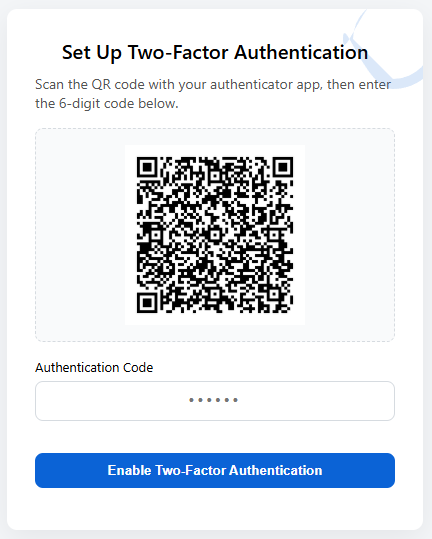
Enable MFA / 2FA for your users to enhance security. Users can setup by scanning QR Code with their favourite authenticator app. Alternatively, you can choose to enable email delivery of time-based, one-time codes.
Use the admin portal to easily reset the user to use a different MFA method or disable MFA if needed.
Users can securely reset their passwords without requiring administrator intervention. The password reset flow uses secure, time-limited tokens sent via email.
When a user requests a password reset:
The password reset pages are fully customizable with HTML and CSS, allowing you to maintain your brand identity throughout the user experience.
Make the authentication experience feel seamlessly integrated with your application. All authentication pages can be customized using HTML and CSS.
Upload your HTML templates and CSS files, and the service will render them with the appropriate authentication forms and validation. This ensures a consistent user experience that feels like a native part of your application.
Advanced refresh token management with IP address awareness provides both security and user convenience.
Refresh tokens have configurable expiration times and can be set to rotate on each use for enhanced security. The service supports both sliding expiration (extend on use) and fixed expiration policies.
Configure how the service handles refresh token usage from different IP addresses:
This balance between security and user experience ensures that legitimate users aren't unnecessarily challenged while protecting against token theft and unauthorized access.
Support different authentication models to match your application's requirements.
Users can authenticate using their email address as their username. This is the most common pattern for modern web applications and provides a familiar experience for users.
Alternatively, configure the service to require distinct usernames separate from email addresses. This allows for more traditional authentication models or applications where users may have multiple email addresses.
Username configuration is set per tenant, allowing different applications or organizations to use the authentication model that best fits their needs.
Protect your authentication endpoints with comprehensive request validation and origin checking.
Configure a whitelist of allowed origins for authorization requests. This prevents unauthorized applications from attempting to use your authentication service and protects against certain types of attacks.
All authentication requests are validated for:
These validations ensure that only legitimate, authorized applications can initiate authentication flows and obtain tokens.
Migrating from another authentication system doesn't have to be disruptive. Our service supports incremental adoption and provides tools to make the transition smooth.
You don't need to migrate all users at once. The service supports running alongside existing authentication systems, allowing you to migrate users gradually or support both systems during a transition period.
Import existing users from your current authentication system with support for:
Make your authentication standards compatible with existing systems by:
This approach minimizes disruption to your existing applications and users while you transition to a more modern, secure authentication system.
Perfect for background services, scheduled jobs, and automated processes. API keys provide long-lived credentials for server-to-server communication without the complexity of token refresh.
Each tenant has both primary and secondary API keys, allowing for zero-downtime key rotation. Generate a new key while keeping the old one active, then switch over when ready.
When you generate a new primary or secondary key, the previous key of the same type is automatically invalidated. This ensures secure key rotation without service interruption.
Exchange your API key for a JWT token when you need to make requests on behalf of a specific user. This is useful for server-side operations that require user context.
Simply include your API key in the X-API-Key header for all API requests. No token refresh needed—use the same key until you rotate it.
Full Create, Read, Update, and Delete (CRUD) operations for users and groups with pagination, filtering, and role-based access control. Manage your user base programmatically through REST APIs.
With comprehensive REST APIs, you can build user management directly into your own applications. Your admins can view users, reset passwords, manage groups, and perform all administrative tasks from within your application—no need to log into the Agglestone Portal. This provides a seamless experience for your team and keeps all management tools in one place.
Complete user lifecycle management:
Organize users into groups for access control:
Users can belong to multiple groups. The default "Tenant Administrators" group provides full access to user and group management, API key management, and administrative privileges. Control access to your APIs based on group membership in JWT tokens.
All list endpoints support pagination with configurable page size. Efficiently manage large user bases without loading everything at once.
OAuth2-compliant endpoints (RFC 7662, RFC 7009) for token management. Verify token validity, check token metadata, and revoke tokens when needed.
The introspection endpoint allows you to verify whether a token is valid and retrieve its metadata without decoding the JWT. This is useful for resource servers that need to validate tokens.
Introspection provides information about:
Revoke access tokens or refresh tokens when they're no longer needed or have been compromised. The revocation endpoint supports both access tokens and refresh tokens.
Revoke all refresh tokens for a specific user across all devices. This is useful when a user reports a lost device or when you need to force a user to re-authenticate.
Token introspection and revocation are essential for:
Keep your frontend simple and secure with the Backend-for-Frontend pattern. Your backend handles all OAuth2/OIDC complexity while your frontend uses simple session-based authentication.
Your backend acts as a secure proxy between your frontend and the authentication service:
The BFF pattern simplifies frontend development:
The BFF pattern is ideal for:
Built from the ground up for multi-tenancy. Every request is tenant-scoped, ensuring complete data isolation and security between tenants.
All data, users, groups, and configurations are isolated per tenant. Users from one tenant cannot access data from another tenant, even with valid credentials.
Every API request includes the tenant ID in the URL path:
The service validates that:
Comprehensive tracking of all login attempts with detailed audit information. Monitor user access patterns and enhance security with complete visibility into authentication events.
Every login attempt is recorded with:
Login history provides:
Login history seamlessly integrates with refresh token management. When a refresh token is used, the service checks the IP address against the user's login history to determine whether to allow silent refresh or require full re-authentication.
Our authentication service implements industry-standard protocols and specifications. For detailed technical information, refer to the following RFC documents:
Additionally, our service implements the OpenID Connect Core 1.0 specification for identity layer functionality on top of OAuth 2.0.